
Introduction
IPTV has transformed the way people access television content by delivering channels, movies, sports, and on-demand programming through internet connections rather than traditional cable or satellite systems. As IPTV continues to gain popularity worldwide, many users are looking for simple and reliable ways to configure their streaming devices and start enjoying their favorite content.
Learning how to set up IPTV with King TV can help users maximize their viewing experience while ensuring smooth and reliable streaming. Whether you plan to watch IPTV on a Smart TV, Fire TV Stick, Android device, smartphone, tablet, or computer, understanding the setup process is essential for getting the best performance.
This guide explains how IPTV works, what equipment you need, how to configure IPTV on different devices, common troubleshooting steps, and important factors to consider before starting.
What Is IPTV?
IPTV stands for Internet Protocol Television. Instead of receiving television signals through satellite dishes or cable networks, IPTV delivers content over the internet.
Most IPTV services provide:
- Live television channels
- Sports programming
- Movies
- TV series
- Video-on-demand content
- Catch-up television
- Electronic Program Guides (EPG)
Services such as King TV use IPTV technology to organize and deliver content across multiple compatible devices.
Why More People Are Choosing IPTV
The popularity of IPTV continues to grow because it offers several advantages compared to traditional television services.
Flexibility
Users can watch content on multiple devices from different locations.
Extensive Content Libraries
Many IPTV platforms provide access to live channels and on-demand content within a single service.
Device Compatibility
IPTV supports a wide range of devices including:
- Smart TVs
- Android TV boxes
- Fire TV Stick
- Smartphones
- Tablets
- Windows PCs
- Mac computers
Improved Streaming Quality
Modern IPTV services often support:
- HD streaming
- Full HD streaming
- 4K streaming
- Adaptive video quality
What You Need Before Setting Up IPTV with King TV
Before beginning the setup process, ensure you have the following:
Stable Internet Connection
A reliable internet connection is one of the most important requirements for IPTV.
Recommended speeds include:
- SD Streaming: 3–5 Mbps
- HD Streaming: 5–10 Mbps
- Full HD Streaming: 10–15 Mbps
- 4K Streaming: 25 Mbps or higher
Compatible Device
Choose a supported device such as:
- Samsung Smart TV
- LG Smart TV
- Android TV
- Fire TV Stick
- Android smartphone
- iPhone or iPad
- Windows computer
- Mac computer
IPTV Subscription Information
Most IPTV services provide login details that may include:
- Username
- Password
- Server URL
- M3U Playlist URL
- Xtream Codes credentials
The exact information depends on the IPTV provider.
IPTV Player Application
Most IPTV services require an IPTV player application to access content.
Popular IPTV player types include:
- IPTV playlist players
- Xtream Codes compatible apps
- Smart TV IPTV applications
- Mobile IPTV apps
Understanding IPTV Login Methods
Most IPTV services support one of the following connection methods.
M3U Playlist
An M3U playlist is a file or URL containing channel information that IPTV applications use to access content.
Xtream Codes API
Xtream Codes is one of the most popular IPTV login methods because it simplifies configuration.
Users typically enter:
- Username
- Password
- Server URL
The application then automatically loads available channels and content.
Portal URL
Some IPTV systems use a portal address that connects directly to the service through compatible devices.
How to Set Up IPTV with King TV on Fire TV Stick
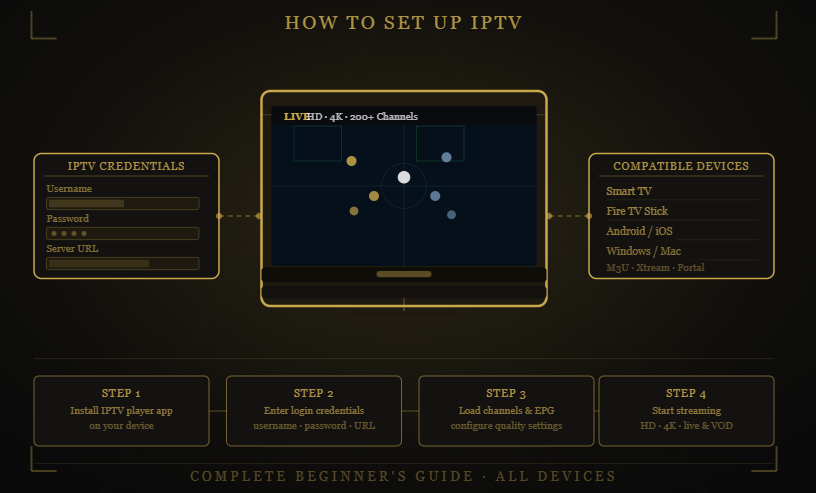
The Fire TV Stick is one of the most widely used IPTV streaming devices.
Step 1: Install an IPTV Player
Download and install a compatible IPTV application from the Amazon App Store or another approved source.
Step 2: Launch the Application
Open the IPTV player after installation.
Step 3: Enter Login Information
Add the information provided by King TV or your IPTV provider.
This may include:
- M3U URL
- Xtream Codes credentials
- Portal URL
Step 4: Load Content
Allow the application to retrieve channel and content information.
Step 5: Start Streaming
Browse available categories and begin watching content.
How to Set Up IPTV with King TV on Android Devices
Android smartphones and tablets offer a simple IPTV setup process.
Download an IPTV App
Install a compatible IPTV player from the Google Play Store.
Add IPTV Credentials
Enter the login details supplied by your IPTV provider.
Configure Settings
Many IPTV applications allow users to customize:
- Video quality
- EPG settings
- Language preferences
- Playback options
Access Content
Once channels load successfully, users can begin streaming immediately.
How to Set Up IPTV with King TV on Smart TVs
Many modern Smart TVs support IPTV applications directly.
Samsung Smart TVs
Compatible IPTV applications can often be installed through the Samsung app marketplace.
LG Smart TVs
LG users can access IPTV applications through the webOS application store.
Android Smart TVs
Android TVs support a large variety of IPTV applications available through Google Play.
After installation:
- Open the IPTV application.
- Enter your IPTV credentials.
- Load channels.
- Configure EPG settings.
- Start watching content.
How to Set Up IPTV with King TV on Windows and Mac Computers
Computers provide another convenient option for IPTV viewing.
Install an IPTV-Compatible Media Player
Choose a player that supports IPTV playlists or Xtream Codes integration.
Import IPTV Credentials
Enter:
- Playlist URL
- Username
- Password
- Server address
Organize Content
Many desktop IPTV applications allow users to create favorites and customize channel groups.
Begin Streaming
After setup is complete, content becomes available directly from the computer.
How Electronic Program Guides Improve IPTV
An Electronic Program Guide (EPG) helps users navigate content efficiently.
Benefits include:
- Channel schedules
- Program descriptions
- Future broadcasts
- Easier navigation
Most modern IPTV services support EPG integration.
Common IPTV Setup Problems and Solutions
Buffering Issues
Possible causes:
- Slow internet connection
- Network congestion
- Router issues
Solutions:
- Restart your router
- Use a wired connection
- Reduce network traffic
- Check internet speeds
Channels Not Loading
Possible causes:
- Incorrect credentials
- Expired subscription
- Server connectivity issues
Solutions:
- Verify login information
- Confirm account status
- Restart the IPTV application
EPG Not Displaying
Possible causes:
- EPG source unavailable
- Application settings issue
Solutions:
- Refresh EPG data
- Reconfigure EPG settings
- Restart the application
Playback Freezing
Possible causes:
- Weak Wi-Fi signal
- Device limitations
- Server congestion
Solutions:
- Move closer to the router
- Restart the device
- Use Ethernet when possible
Best Practices for IPTV Performance
To get the best results from IPTV services such as King TV, consider the following recommendations.
Use a Reliable Internet Connection
Stable internet performance directly affects streaming quality.
Keep Devices Updated
Software updates improve performance, compatibility, and security.
Restart Devices Periodically
Regular restarts can help resolve temporary issues.
Use Modern Networking Equipment
Newer routers often provide better IPTV performance than older hardware.
Monitor Bandwidth Usage
Heavy downloads or multiple simultaneous streams may affect playback quality.
Security Considerations for IPTV Users
Maintaining account security is important when using IPTV services.
Use Strong Passwords
Avoid simple passwords that can be easily guessed.
Protect Your Home Network
Secure Wi-Fi networks using modern encryption methods.
Install Applications From Trusted Sources
Only use reputable IPTV applications and software.
Keep Software Updated
Updates often include important security improvements.
Future Trends in IPTV Technology
The IPTV industry continues to evolve rapidly.
Emerging trends include:
- Increased 4K content availability
- 8K streaming support
- AI-powered recommendations
- Cloud DVR functionality
- Improved multi-device synchronization
- Faster content delivery technologies
These developments will continue improving the IPTV viewing experience for users worldwide.
Frequently Asked Questions
What is required to set up IPTV with King TV?
Users typically need a stable internet connection, a compatible device, IPTV credentials, and an IPTV player application.
Can I use IPTV on multiple devices?
Many IPTV services support multiple devices, although availability depends on the subscription plan.
Is IPTV compatible with Smart TVs?
Yes. Most modern Smart TVs support IPTV applications or IPTV-compatible media players.
What internet speed is recommended for IPTV?
HD streaming generally requires 5–10 Mbps, while 4K streaming performs best with 25 Mbps or higher.
What is an M3U playlist?
An M3U playlist is a file or URL containing IPTV channel information used by compatible applications.
What should I do if IPTV keeps buffering?
Check your internet connection, restart your router, reduce network congestion, and verify that your IPTV service is operating normally.
Conclusion
Learning how to set up IPTV with King TV is a straightforward process when you understand the basic requirements and configuration methods. Whether using a Smart TV, Fire TV Stick, Android device, smartphone, tablet, or computer, proper setup helps ensure a smooth and enjoyable streaming experience.
By choosing compatible devices, maintaining a reliable internet connection, configuring IPTV applications correctly, and following best practices for performance and security, users can maximize the benefits of IPTV technology.
As IPTV continues to evolve and improve, services like King TV and other IPTV providers will continue offering more flexible and feature-rich entertainment experiences. Taking the time to set up IPTV properly today can lead to better performance, fewer technical issues, and a more enjoyable viewing experience in the future.
Ready to get started with IPTV? Review your device compatibility, prepare your IPTV credentials, follow the setup steps outlined above, and enjoy a seamless streaming experience across your favorite devices.