
Introduction
Television streaming has evolved significantly over the last few years, with internet-based services becoming a preferred alternative to traditional cable and satellite subscriptions. As more households seek flexible and cost-effective ways to access entertainment, IPTV technology continues to gain popularity worldwide.
Among the growing number of IPTV services available today, King TV has become a frequently discussed option for viewers looking for access to live channels, on-demand content, and multi-device streaming through a single platform. Whether you are completely new to IPTV or simply exploring different streaming solutions, understanding how King TV works can help you determine whether it meets your entertainment needs.
This guide explores the main features of King TV, explains its advantages, outlines the setup process across different devices, and provides practical tips to help users get the most from their IPTV experience.
What Is King TV?
King TV is an IPTV (Internet Protocol Television) service that delivers television content through an internet connection rather than traditional broadcasting methods such as cable or satellite networks.
Instead of relying on physical infrastructure, IPTV technology streams live channels, movies, television series, and other digital content directly to compatible devices. Users typically receive account credentials that can be added to an IPTV player application, allowing immediate access to available content.
This approach offers greater flexibility compared to conventional television services, as viewers can access content on multiple devices from virtually any location with a stable internet connection.
How King TV Works
King TV generally provides users with access credentials in one of the following formats:
- M3U Playlist URL
- Xtream Codes Login
- Server URL with username and password
These details are entered into a compatible IPTV player, which then loads the available channel lineup and content library directly from the service’s servers.
Once configured, users can browse channels, access video-on-demand content, and use available viewing features through their chosen IPTV application.
Key Features of King TV
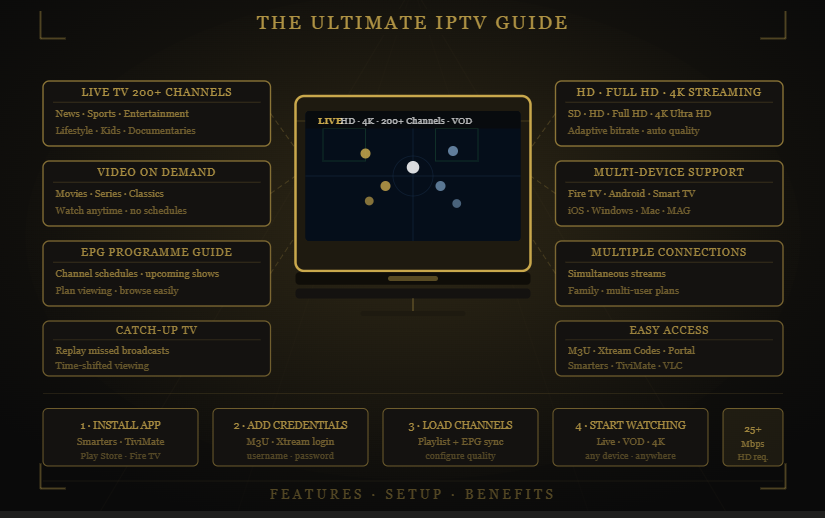
Extensive Live TV Channel Selection
One of the most notable aspects of King TV is its large collection of live television channels.
Content is often organized into categories such as:
- News
- Sports
- Entertainment
- Lifestyle
- Kids programming
- Documentaries
- International channels
The availability of content from multiple countries makes IPTV particularly appealing for multilingual viewers and households interested in global programming.
Video on Demand (VOD)
In addition to live television, King TV commonly includes a Video on Demand section containing movies and television series.
This allows users to watch content whenever convenient rather than following traditional broadcast schedules.
The VOD library may include:
- Recent releases
- Popular TV series
- Family content
- Documentaries
- Classic movies
Having both live television and on-demand entertainment in one platform provides greater viewing flexibility.
Electronic Program Guide (EPG)
Many King TV plans support an Electronic Program Guide.
The EPG functions similarly to traditional television guides by displaying:
- Current programming
- Upcoming shows
- Channel schedules
- Program information
This feature makes navigation easier and helps viewers plan their viewing schedules more efficiently.
Multi-Device Support
Modern viewers rarely use a single screen for entertainment, and IPTV services have adapted accordingly.
King TV is compatible with various devices including:
- Amazon Firestick
- Fire TV devices
- Android TV boxes
- Android smartphones and tablets
- Samsung Smart TVs
- LG Smart TVs
- Windows computers
- Mac computers
- MAG devices
This broad compatibility allows users to access their content across multiple platforms.
Multiple Connections
Some subscription plans support simultaneous streaming on more than one device.
This feature can be useful for families where multiple viewers want to watch different content at the same time without requiring separate television subscriptions.
HD and 4K Streaming
Streaming quality is an important consideration for many viewers.
Depending on the channel and available bandwidth, King TV may support:
- Standard Definition (SD)
- High Definition (HD)
- Full HD
- 4K Ultra HD
Actual quality depends on factors such as internet speed, device capabilities, and source availability.
Catch-Up TV Features
Certain IPTV packages may include catch-up functionality.
This allows viewers to watch previously aired programs within a specific timeframe after broadcast.
Catch-up features can be particularly useful for viewers who miss live events or regularly watch content on delayed schedules.
Benefits of Using King TV
Lower Entertainment Costs
One reason many households explore IPTV services is cost efficiency.
Traditional television subscriptions often include:
- Equipment rental fees
- Installation costs
- Premium channel charges
- Long-term contracts
Internet-based television services generally reduce many of these additional expenses, making them an attractive option for budget-conscious viewers.
Flexible Viewing
Unlike traditional television systems tied to a specific location, IPTV allows content to be accessed across multiple devices.
Users can switch between:
- Television screens
- Smartphones
- Tablets
- Laptops
This flexibility supports modern viewing habits and mobile lifestyles.
Access to International Content
Many viewers seek programming that is not easily available through standard cable packages.
King TV often includes channels from different regions, making it easier to access content in multiple languages and from various countries.
No Long-Term Commitment
Many IPTV subscriptions operate on flexible billing structures.
Rather than committing to lengthy service agreements, users can often choose monthly plans that allow them to evaluate the service according to their own needs.
Personalized Entertainment Experience
With access to live channels, VOD libraries, catch-up content, and customizable IPTV players, users can create a viewing experience tailored to their preferences.
How to Set Up King TV
Installing King TV on Firestick
- Open Settings on your Firestick.
- Navigate to My Fire TV.
- Enable installation from external sources if required.
- Install an IPTV player application.
- Enter your King TV login details.
- Load the playlist and begin streaming.
Installing King TV on Android TV
- Open the Google Play Store.
- Install a compatible IPTV player.
- Launch the application.
- Add your IPTV credentials.
- Allow the playlist to load.
- Access your channels and content.
Installing King TV on Smartphones
- Download an IPTV player from the appropriate app store.
- Open the application.
- Add playlist information or Xtream Codes credentials.
- Save the configuration.
- Begin watching available content.
Choosing an IPTV Player for King TV
The IPTV player influences navigation, content organization, and overall usability.
IPTV Smarters Pro
Popular for its:
- User-friendly design
- Playlist management
- EPG support
- Multi-device compatibility
TiviMate
Widely used among Android TV and Firestick users because of its:
- Advanced channel organization
- Modern interface
- EPG functionality
- Playlist support
GSE Smart IPTV
Known for:
- Broad device compatibility
- Flexible configuration options
- Multiple playback methods
VLC Media Player
A simple alternative that supports playlist loading and basic IPTV playback on multiple operating systems.
Tips for a Better Streaming Experience
Use a Stable Internet Connection
A reliable internet connection remains the most important factor for smooth IPTV streaming.
Recommended speeds include:
- 10 Mbps for SD content
- 25 Mbps for HD content
- 50 Mbps or higher for 4K streaming
Prefer Wired Connections
Ethernet connections often provide greater stability than Wi-Fi, particularly when streaming high-resolution content.
Keep Applications Updated
Updating IPTV applications regularly helps improve compatibility, stability, and performance.
Clear Cache Periodically
Removing temporary application data can help maintain smooth performance over time.
Consider Network Optimization
Ensuring that routers, streaming devices, and home networks are properly configured can reduce buffering and playback interruptions.
Frequently Asked Questions
What devices support King TV?
King TV can typically be used on Firestick devices, Android TV boxes, Smart TVs, smartphones, tablets, computers, and other IPTV-compatible hardware.
Do I need a separate IPTV application?
Yes. Most IPTV services require a compatible player application where account credentials can be entered.
Can King TV be used while traveling?
Since IPTV operates through internet connectivity, content can generally be accessed from different locations provided a stable connection is available.
What internet speed is recommended?
For HD streaming, speeds of at least 25 Mbps are commonly recommended, while 4K content may require 50 Mbps or more.
Does King TV include on-demand content?
Many subscription plans include both live channels and a Video on Demand library, although available content may vary by package.
Conclusion
King TV demonstrates how IPTV technology continues to reshape the way viewers access television content in 2026. By combining live channels, on-demand entertainment, multi-device compatibility, and flexible viewing options, IPTV services provide an alternative to traditional cable and satellite systems.
Understanding the available features, supported devices, setup requirements, and performance considerations can help users determine whether King TV aligns with their entertainment preferences. Before choosing any IPTV service, it is always worthwhile to review available plans, compare features, and ensure that your internet connection can support the streaming quality you expect.
As internet-based television continues to expand, IPTV platforms remain an increasingly important part of the modern entertainment landscape.